Flanger
Администратор
-
Зарегистрирован
Весь контент Flanger
-
-
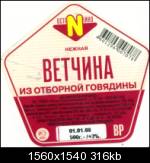
http://supercook.ru/za-25.htmlКупил я тут для салата ветчины и тут как раз прям наклейка с составом продукта отвалилась и я стал её разглядывать, я с детства любил читать что пишут на банках, пачка и т.д. продуктов и уже тогда, что такое белки, жиры углеводы и каллории не было для меня загадкой... И так, из чего же сделана эта так называемая "ветчина из отборной говядины"? Говядина, ну тут все понятно. Хотя, процитирую фразу из статьи, ссылка на которую есть в конце: "Вместе с мясом, птицей, яйцами или молоком мы потребляем массу скрытых ингредиентов: антибиотики, половые гормоны, стероиды, пестициды, консерванты и добавки." Крахмал, ну хз что он делает в ветчине, но вроде не вызывает особых сомнений... Растительный белок, ОПА, это не что иное как СОЯ! из отборной говядины говорите 😉 ? А как известно, ща практически вся соя генномодифицированна, я не знаю хорошо это или плохо , к этой спекуляции мы ещё вернемся. Соль, без комментариев И тут начинается самое интересное: регуляторы кислотности: Е262, Е450. Залезаем в инет и смотрим что это за гавно- Е262: Ацетаты натрия: (i)Ацетат натрия, (ii)Диацетат натрия. Е450: Пирофосфаты (дифосфаты): (i) Пирофосфат динатрия, (ii) Пирофосфат тринатрия, (iii) Пирофосфат тетранатрия, (iv) Пирофосфат дикалия, (v) Пирофосфат тетракалия, (vi) Пирофосфат дикальция, (vii) Дигидропирофосфат кальция, (viii) Пирофосфат димагния. Страшно? Смотрим дальше Пряности, приправы наверное. Стабилизатор Е407. Смотрим что это- Е407- Каррагинаны: (i) Каррагинан и его натриевая, калиевая и аммонийные соли, (ii) Каррагинан из водорослей Euchema. Мне от этого одного слова стремно стало Сахар, я хз зачем в ветчине сахар. Аскорбиновая кислота, тоже хз, она вроде консервант. И снова: Пищевые красители: Е120, Е124. Е120- Кармин (фр. carmin, от араб. кирмиз — кошениль и лат. minium — киноварь) — красный краситель (E120), получаемый из карминовой кислоты, производимой самками насекомых кошенили. Кашениль, это тля такая, из неё делали суперстойкую краску. Е124- Понсо 4R (пунцовый 4R (ponceau 4r), кошенилевый красный А). Разрешено в России и странах Европы. В некоторых странах (включая США, Норвегию и Финляндию) внесён в список запрещённых веществ как канцероген. Обладает способностью вызывать аллергические реакции у людей, чувствительных к аспирину, и провоцировать приступы удушья у астматиков. Продолжаем: Усилитель вкуса Е621- Глутамат натрия однозамещенный. Некоторые исследователи связывают с глутаматом натрия воздействие на головной мозг (от головной боли до болезни Альцгеймера), ухудшение состояния больных бронхиальной астмой, синдром "китайского ресторана", разрушение сетчатки глаза, глаукому. Тем не менее, большинство источников указывают на то, что употребление глутамата натрия в пищу в небольших дозах не оказывает воздействия на здоровье. Фиксатор окраски Е250- Нитрит натрия. Нитрит натрия является общеядовитым токсичным веществом, в том числе и для млекопитающих (50 процентов крыс погибают при дозе в 180 миллиграмм на килограмм веса) При исследованиях выявлено образование канцерогена N-нитрозамина при реакции нитрита натрия с аминокислотами при их нагреве, что означает потенциальную возможность образования раковых изменений при употреблении продуктов проходивших тепловую обработку в присутствии нитрита натрия. Последние исследования обнаружили связь между употреблением подобных продуктов и раком кишечника. Помните в начале статьи, я писал про генномодифицированную сою? Так вот видим внизу на этикетке надпись -"Генетически безопасный продукт". А так ли он безопасен со всем этим дерьмом??? Вот такие пироги и так во всем. И в довесок- ссылка на статью
Аккаунт
Навигация
Поиск
Configure browser push notifications
Chrome (Android)
- Tap the lock icon next to the address bar.
- Tap Permissions → Notifications.
- Adjust your preference.
Chrome (Desktop)
- Click the padlock icon in the address bar.
- Select Site settings.
- Find Notifications and adjust your preference.
Safari (iOS 16.4+)
- Ensure the site is installed via Add to Home Screen.
- Open Settings App → Notifications.
- Find your app name and adjust your preference.
Safari (macOS)
- Go to Safari → Preferences.
- Click the Websites tab.
- Select Notifications in the sidebar.
- Find this website and adjust your preference.
Edge (Android)
- Tap the lock icon next to the address bar.
- Tap Permissions.
- Find Notifications and adjust your preference.
Edge (Desktop)
- Click the padlock icon in the address bar.
- Click Permissions for this site.
- Find Notifications and adjust your preference.
Firefox (Android)
- Go to Settings → Site permissions.
- Tap Notifications.
- Find this site in the list and adjust your preference.
Firefox (Desktop)
- Open Firefox Settings.
- Search for Notifications.
- Find this site in the list and adjust your preference.