Flanger
Администратор
-
Зарегистрирован
Весь контент Flanger
-
Уж чего я не ожидал, что судя по всему, он ещё и неплохо сделан
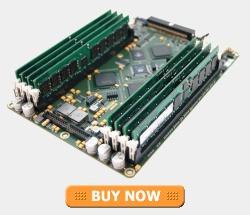
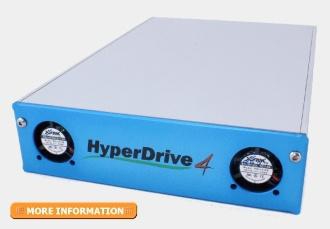
Твердотелый накопитель на основе DDR CDROM drive form factor. Fits into a standard 5.25" CD bay. It is Bootable. It connects just like a Hard Disk or a CDROM. Does not require any drivers. IDE/PATA and SATA connectors onboard. ATA133 UDMA6 bus 8 DRR1 DIMM slots, each of which can take registered ECC DIMMs up to 1GB in capacity on the 8GB(max) version and up to 2GB on the 16GB(max) version (no on-board RAM included). HyperDrive4 (Revision 2) - 8GB max £599 (+ VAT) $1169 (US) HyperDrive4 (Revision 2) - 16GB max £699 (+ VAT) $1359 (US) страница продукта
Аккаунт
Поиск
Configure browser push notifications
Chrome (Android)
- Tap the lock icon next to the address bar.
- Tap Permissions → Notifications.
- Adjust your preference.
Chrome (Desktop)
- Click the padlock icon in the address bar.
- Select Site settings.
- Find Notifications and adjust your preference.
Safari (iOS 16.4+)
- Ensure the site is installed via Add to Home Screen.
- Open Settings App → Notifications.
- Find your app name and adjust your preference.
Safari (macOS)
- Go to Safari → Preferences.
- Click the Websites tab.
- Select Notifications in the sidebar.
- Find this website and adjust your preference.
Edge (Android)
- Tap the lock icon next to the address bar.
- Tap Permissions.
- Find Notifications and adjust your preference.
Edge (Desktop)
- Click the padlock icon in the address bar.
- Click Permissions for this site.
- Find Notifications and adjust your preference.
Firefox (Android)
- Go to Settings → Site permissions.
- Tap Notifications.
- Find this site in the list and adjust your preference.
Firefox (Desktop)
- Open Firefox Settings.
- Search for Notifications.
- Find this site in the list and adjust your preference.