



Flanger
Администратор
-
Зарегистрирован
Весь контент Flanger
-
This is not as easy as it looks. - 9GAG.mp4
-
-
Finally Some Good Fking Food, get ready for COVID 21 PRO+ -.webm

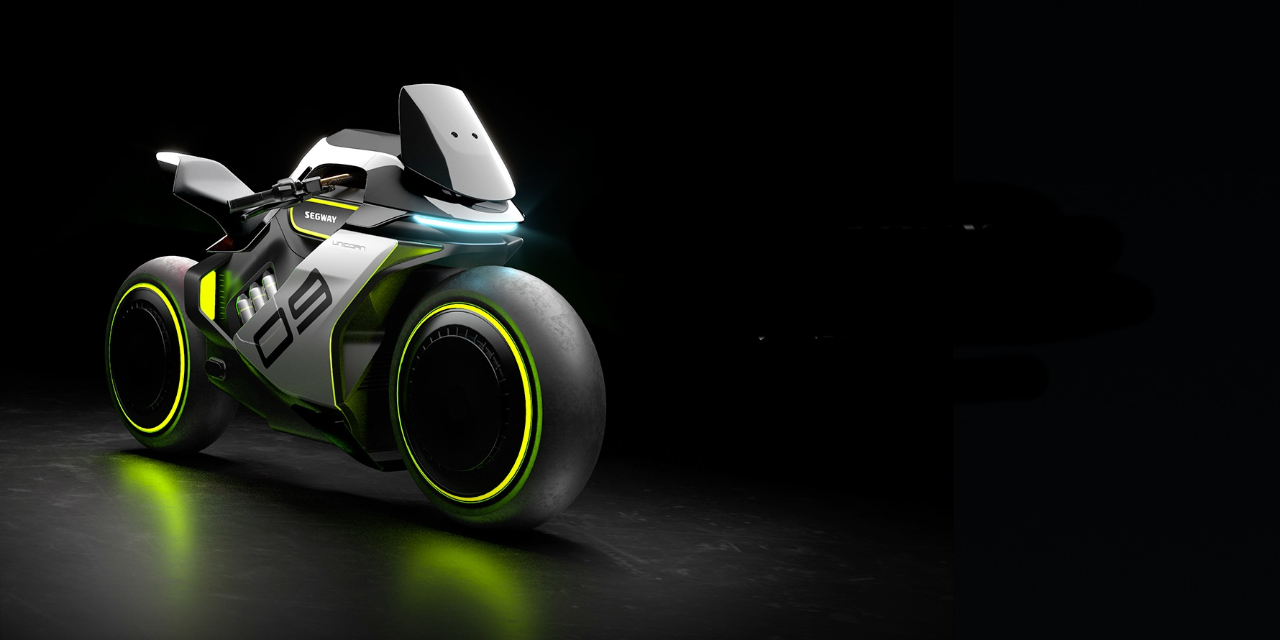 Футуристический водородный мотоцикл с «парящими колёсами». Segway Apex H2 через два года станет серийным продуктом Однако есть у компании и более интересные проекты. К примеру, водородный мотоцикл Apex H2. Пока это лишь концепт, но источник говорит, что компания действительно собирается воплотить идею в серийном продукте, причём уже в 2023 году. Какими будут параметры у серийного мотоцикла, пока можно лишь гадать, а вот концепт получил силовую установку мощностью 80 л.с., которая позволяет разгоняться до 100 км/ч за 4 с и развивать максимальную скорость в 150 км/ч. Футуристический водородный мотоцикл с «парящими колёсами». Segway Apex H2 через два года станет серийным продуктом Также, безусловно, стоит выделить футуристический дизайн мотоцикла. Особенно впечатляюще смотрятся колёса с односторонними вилками, хотя как раз этот элемент вряд ли появится у серийной модели. Segway считает, что её водородный мотоцикл будет стоить около 10 700 долларов.Думаю пора открывать тему. Уже бурят, берут пробы грунта

























Аккаунт
Навигация
Поиск
Configure browser push notifications
Chrome (Android)
- Tap the lock icon next to the address bar.
- Tap Permissions → Notifications.
- Adjust your preference.
Chrome (Desktop)
- Click the padlock icon in the address bar.
- Select Site settings.
- Find Notifications and adjust your preference.
Safari (iOS 16.4+)
- Ensure the site is installed via Add to Home Screen.
- Open Settings App → Notifications.
- Find your app name and adjust your preference.
Safari (macOS)
- Go to Safari → Preferences.
- Click the Websites tab.
- Select Notifications in the sidebar.
- Find this website and adjust your preference.
Edge (Android)
- Tap the lock icon next to the address bar.
- Tap Permissions.
- Find Notifications and adjust your preference.
Edge (Desktop)
- Click the padlock icon in the address bar.
- Click Permissions for this site.
- Find Notifications and adjust your preference.
Firefox (Android)
- Go to Settings → Site permissions.
- Tap Notifications.
- Find this site in the list and adjust your preference.
Firefox (Desktop)
- Open Firefox Settings.
- Search for Notifications.
- Find this site in the list and adjust your preference.